
SPDT Switch: What Is a Single Pole Double Throw Switch?
Updated June 4, 2026 · 10 min read
You have a single power source and you need to send it to one of two places — a motor to spin forward or backward, a light controlled from two locations, or a control panel switchable between Manual and Auto. The component that does this is the SPDT (Single Pole Double Throw) switch.
This guide explains what an SPDT switch is, how it works, how to wire it, and — most importantly — how to tell whether you actually need SPDT versus SPST or DPDT. If you are sourcing switches for a project, there is a buyer checklist at the end.
What Is an SPDT Switch?
SPDT stands for Single Pole Double Throw. The name tells you exactly what it does:
- Single Pole — The switch controls one circuit. There is a single input connection (the Common terminal).
- Double Throw — The input can be connected to either of two outputs. You “throw” the connection one way or the other.
The simplest analogy is a railroad switch: one track arrives at a junction. You flip the switch to send the train onto Track A or Track B — but never both at the same time.
The Three Terminals
Every SPDT switch has three connection points:
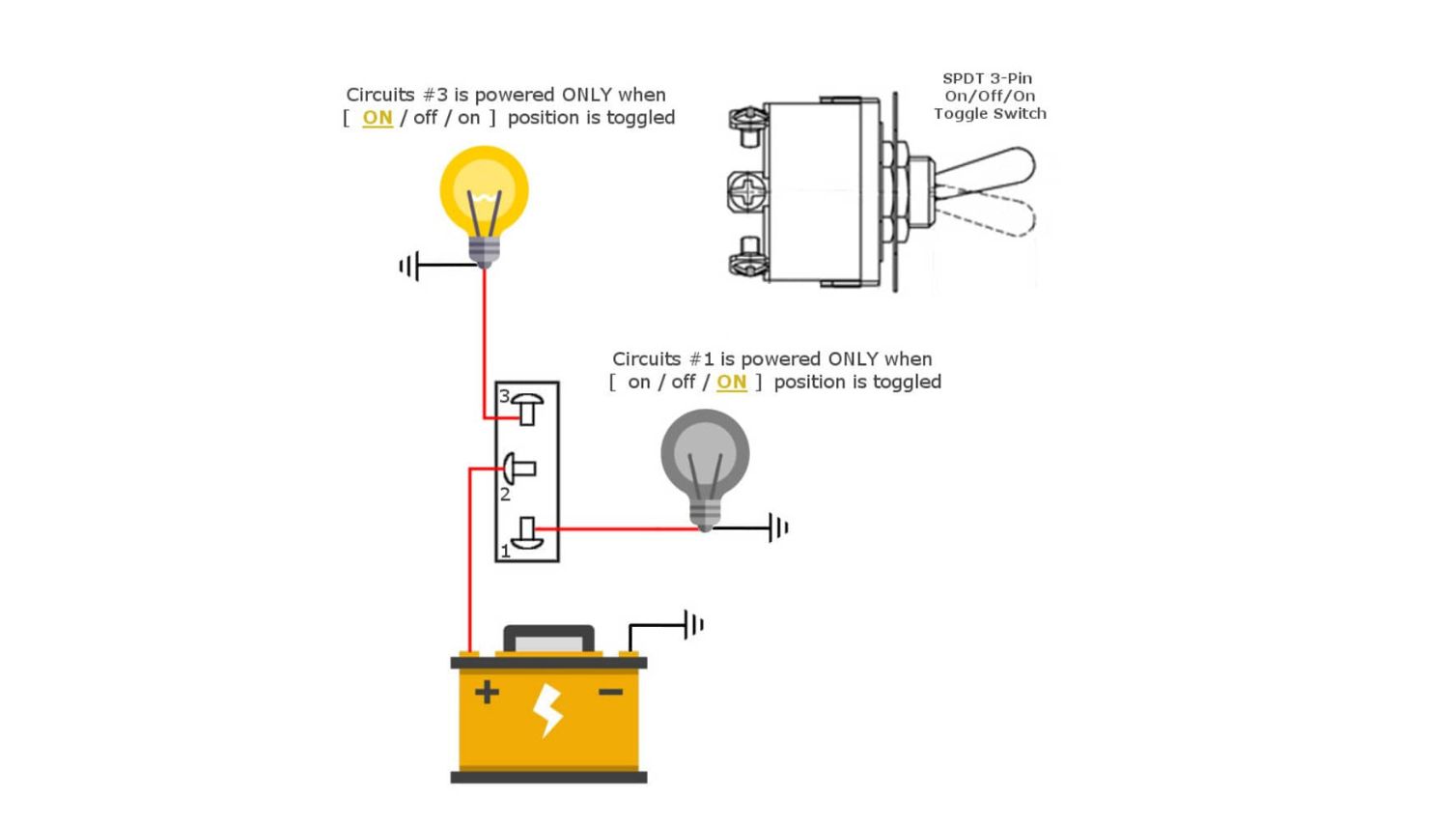
| Terminal | Name | What It Does |
|---|---|---|
| COM | Common | Input — connect your power source or signal here. |
| NO | Normally Open | Output — disconnected from COM in the resting state. Connects when you actuate the switch. |
| NC | Normally Closed | Output — connected to COM in the resting state. Disconnects when you actuate the switch. |
How an SPDT Switch Works

Inside the switch, a movable metal contact pivots between two fixed contacts. Here is what happens step by step:
- Default state: The movable contact connects COM to NC. Current flows from the power source, into COM, through to NC, and onward to whatever is connected there. NO is isolated — no current flows.
- Actuated state: You flip the toggle (or press the button, or slide the lever). The internal contact pivots. It breaks the COM-NC connection first, then makes a new COM-NO connection. Current now flows from COM to NO instead. NC is isolated.
- Return: In a momentary switch, releasing the actuator springs the contact back to COM-NC. In a latching (maintained) switch, it stays in whichever position you moved it to.
Because the switch is break-before-make, there is a brief moment (milliseconds) during switching when COM is not connected to anything. This is normal and intentional.
How to Wire an SPDT Switch
Wiring is straightforward once you identify COM, NO, and NC. Here is the most common configuration — using the switch as a selector between two devices:
Selector wiring:
- Connect your power source to COM.
- Connect Device A to NO — it turns on when the switch is toggled.
- Connect Device B to NC — it stays on by default and turns off when toggled.
One switch selects between two devices. Only one operates at a time.
Using SPDT as an On/Off Switch
Leave one output terminal unconnected. Wire COM to power and NO to your load (leave NC empty). Flick the switch: power flows (on) or stops (off). Some SPDT switches also come in an ON/OFF/ON configuration with a center position where COM disconnects from both outputs — this gives you a true off state.
SPDT for DC Motor Reversal
Wire +12V to COM. Connect the motor positive lead to NO and motor negative lead to NC. Connect GND to the motor’s other terminal. In the default position, current flows one way through the motor. Toggle the switch, and the polarity reverses — the motor spins the opposite direction. This is used in power seats, window actuators, and small robotics.
SPST vs SPDT vs DPDT: What Is the Difference?
These three switch types are frequently confused. Here is a direct comparison:
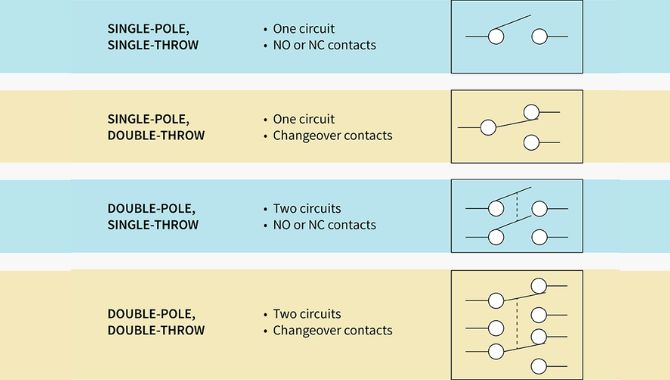
| SPST | SPDT | DPDT | |
|---|---|---|---|
| Name | Single Pole Single Throw | Single Pole Double Throw | Double Pole Double Throw |
| Terminals | 2 | 3 (COM, NO, NC) | 6 |
| What It Does | ON/OFF for one circuit | Selects between two outputs for one circuit | Selects between two outputs for two independent circuits |
| Common Use | Light switch, power switch | 3-way lighting, mode selection, motor reversal | Switching both power lines, redundant signaling |
| Pick This When… | You only need ON/OFF | You need to route one input to one of two outputs | You need to switch two circuits simultaneously |
Which One Should You Choose?
Quick decision guide:
- Need simple ON/OFF? → SPST (simpler, cheaper)
- Need to select between two paths for one circuit? → SPDT
- Need to switch two circuits at the same time? → DPDT
Common SPDT Switch Applications
SPDT switches appear across many industries. Here are the most common real-world uses:
1. Three-Way Lighting (Household)
This is the most familiar SPDT application for most people. Two SPDT switches wired together let you control a single light from two locations — the top and bottom of a staircase, or both ends of a hallway. In residential wiring, these are called 3-way switches. Each switch routes the hot wire to one of two traveler wires, and the two switches must be installed in pairs. Because of the switching action, 3-way switches do not have marked ON/OFF positions.
2. Industrial Mode Selection
Control panels use SPDT switches to select between operating modes: Manual/Auto, Local/Remote, Run/Setup. The switch routes a control signal to one of two logic paths in a PLC or relay system.
3. DC Motor Polarity Reversal
As described above, one SPDT switch reverses motor direction by swapping polarity. Applications include power seats, window actuators, conveyor belts, and robot arms.
4. Audio Signal Routing
Guitar pickup selectors and audio input selectors use SPDT switches to direct a signal to one of two destinations.
5. Industrial Valve Position Indication
In control rooms, SPDT switches drive two indicator lights per valve position — one for “open” and one for “closed.” This ensures the operator can always confirm the valve status regardless of the switch position. Industrial SPDT switches used here require stiffer contact springs and engineered housing materials to resist dirt and prevent freeze-up in cold conditions.
6. Safety Interlock Systems
Wire the NC terminal to the machine run circuit and the NO terminal to an alarm or brake. When the safety guard opens, the NC connection breaks (stopping the machine) and the NO connection activates the alarm — all in one action.
How to Choose an SPDT Switch: Buyer Checklist
When sourcing SPDT switches, check these five specifications:
- Electrical ratings. The switch must be rated for the maximum voltage and current in your circuit. Leave at least a 20% safety margin. Running a 5A switch at 10A causes overheating and failure.
- Actuation type. Momentary (springs back) for jog controls and signaling. Latching (stays in position) for mode selection and routing.
- Mounting style. Panel mount (through an enclosure cutout) for control panels. PCB mount (soldered to a board) for compact electronics. Chassis mount for equipment frames.
- Environmental protection. Standard switches for clean indoors. IP65/IP67-rated sealed switches for outdoor, marine, dusty, or wet environments.
- Certifications. UL/cUL for North America, CE for Europe, RoHS for global compliance. These are mandatory for many markets and ensure independent safety testing.
Frequently Asked Questions
The SPDT switch is simple — one input, two outputs, a mechanical contact that selects between them. But that simple function is the basis for three-way lighting, motor direction control, mode selection, signal routing, and safety systems across nearly every industry.
If you are sourcing switches, focus on the five specifications: electrical rating, actuation type, mounting style, IP rating, and certifications. Match the switch to the application, and it will deliver reliable performance for years.
Need SPDT switches for your project?
WEUP manufactures SPDT switches in toggle, rocker, push button, and micro switch formats — all UL, CE, and RoHS certified. Browse the full range or contact our team for a recommendation.
Related: Original SPDT Article ·
Toggle Switches ·
Rocker Switches ·
Micro Switches